
Running Apache NiFi 2.5.x on Amazon EKS with GitLab CI/CD

What we built, and What we learned.

Apache NiFi 2.x is not just a version bump. The UI is rebuilt, basic authentication is gone, the REST API changed, and the clustering model is considerably tighter. When we set out to run NiFi 2.5.x on Amazon EKS with fully automated flow deployments through GitLab CI/CD, we expected the path to be reasonably straightforward. It was not.

This post is about what we built, what tripped us up, and the fixes that actually worked — written the way we wish someone had written it before we started.
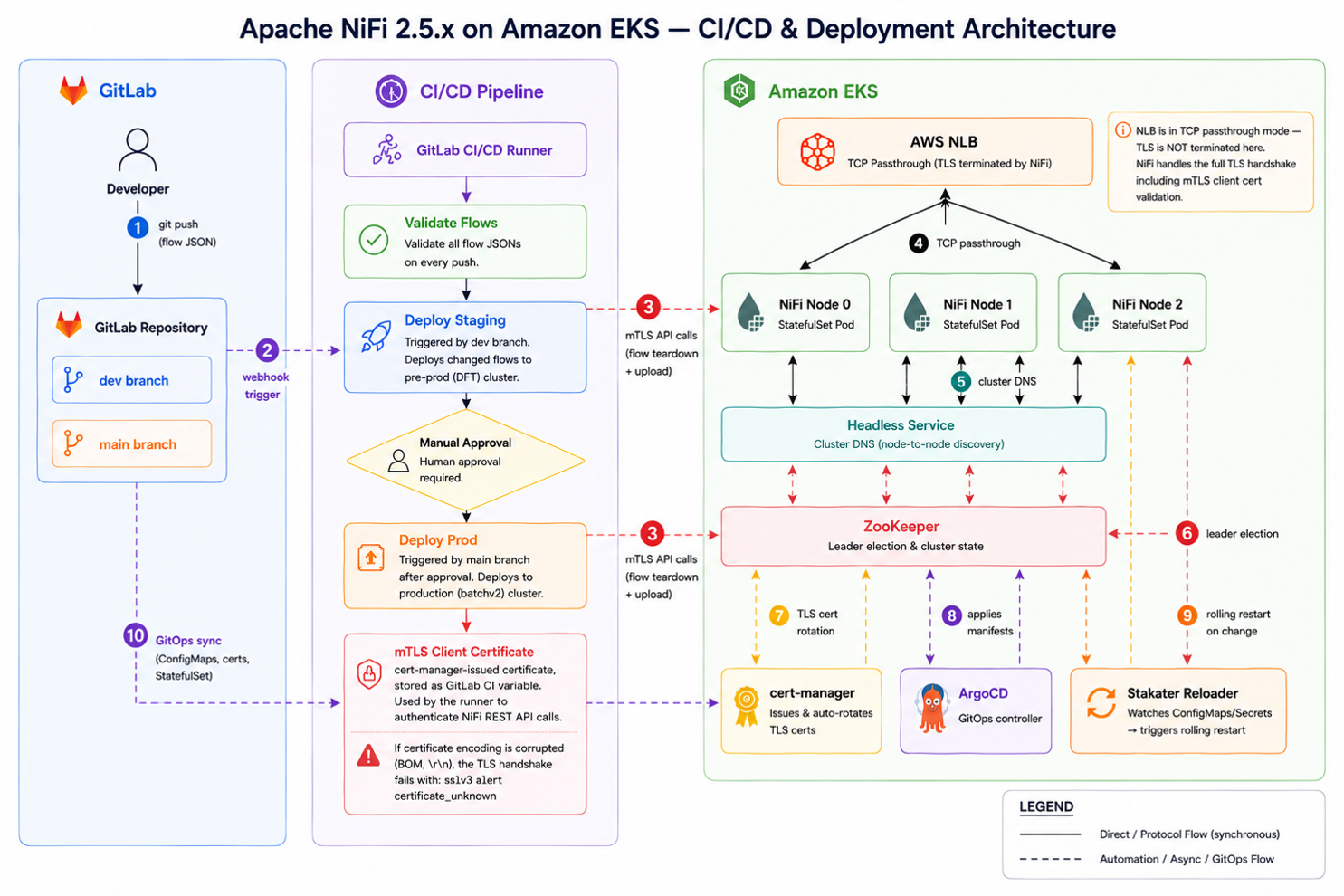

What We Built

The goal was simple to describe: a production NiFi cluster on EKS that developers don’t have to touch manually. Export a flow JSON from the canvas, push it to Git, and the pipeline takes care of deploying it — tearing down the old version, uploading the new one, and rewiring the canvas connections without any manual steps.

What that actually required under the hood was more involved.

The Cluster

We ran NiFi as a StatefulSet — three nodes, each with its own persistent volumes for the content, flowfile, and provenance repositories. We chose StatefulSet over a Deployment because NiFi is inherently stateful: it needs stable pod identities and dedicated local storage. Pod anti-affinity rules ensure no two NiFi nodes ever land on the same EC2 host, so a single node failure doesn’t take more than one NiFi pod with it. One of the genuine improvements in NiFi 2.x is that it dropped the external ZooKeeper dependency entirely. Cluster coordination and leader election now run on an embedded Raft consensus system — one less stateful component to manage alongside the cluster.

TLS Everywhere

NiFi 2.x doesn’t give you an option to skip TLS. Every connection — node to node, browser to UI, API client to cluster — is TLS-only. We used cert-manager to issue and auto-rotate all node certificates, and configured the AWS Network Load Balancer in TCP passthrough mode. That last part matters: if the NLB terminates TLS, the mTLS client certificate never reaches NiFi, and authentication silently fails. The load balancer has to pass the raw TCP stream straight through.

GitOps-Managed Infrastructure

ArgoCD manages all cluster configuration. Every change — truststore updates, certificate specs, StatefulSet annotations — has to go through a Git pull request. If you run kubectl apply directly, ArgoCD overwrites it within minutes. This is actually a feature, not a constraint: it means every infrastructure change has a reviewer, a timestamp, and a paper trail.

Stakater Reloader watches for ConfigMap and Secret changes and triggers rolling pod restarts automatically. So when cert-manager rotates a certificate or we update the truststore, the NiFi nodes restart one by one to pick it up — with no manual intervention and no downtime.

The Deployment Pipeline

The GitLab CI/CD pipeline has three stages. First, a validation step that parses every flow JSON file and confirms it’s a valid NiFi export structure — a malformed file that bypasses this step could wipe a running process group and fail to replace it, leaving the canvas broken. Second, a staging deploy that detects which flow files actually changed via git diff and only redeploys those. Third, a production deploy that requires a manual approval before running.

The pipeline authenticates to the NiFi REST API using an mTLS certificate — no username, no password, no browser session. The runner calls the API directly, tears down the old process group in the specific sequence NiFi requires, uploads the new flow JSON, and reconstructs the canvas wiring.

The NiFi 2.x REST API is a state machine. Every operation has prerequisites. Violating the order returns HTTP 409 — and the error message usually won't tell you what you missed.

What Broke, and How We Fixed It

Most of the hard work in this project wasn’t the infrastructure setup — it was getting the NiFi API automation right. NiFi 2.x enforces a strict process group lifecycle that our deployment script had to learn the hard way. We also spent more time than expected on TLS configuration. Here’s the honest account of what went wrong and how we worked through it.

The Problem What Was Actually Happening How We Fixed It
The mTLS handshake kept failing We’d get sslv3 alert certificate_unknown on every pipeline run and couldn’t tell why. Turned out to be three separate problems stacked on top of each other — incomplete cert chain in the GitLab variable, the root CA missing from NiFi’s truststore, and GitLab’s variable editor quietly corrupting the PEM with invisible characters (BOM, carriage returns). Full cert chain stored in the variable (leaf + intermediate + root). Both CAs added to the truststore ConfigMap via a Git PR — direct kubectl apply gets overwritten by ArgoCD in minutes. Added a sanitisation script that strips encoding artefacts at runtime and logs exactly which certificate identity the pipeline is authenticating as, on every run.
HTTP 409 — queues “not empty” we couldn’t find The NiFi API’s GET /connections only shows top-level connections. Our flow had nested sub-process groups with their own queues, invisible to the flat API call. NiFi wouldn’t delete the PG but wouldn’t tell us where the non-empty queues actually were. Rewrote the queue collection step as a recursive function that walks the full process group tree before purging anything.
HTTP 409 — controller services we couldn’t see Same scoping problem, different resource. A schema reader service two levels deep stayed ENABLED and kept blocking deletion. The flat controller services endpoint didn’t surface it. Wrote a recursive collect_all_cs() function and polled until every service in the full tree confirmed DISABLED before moving on.
HTTP 409 — the blocker wasn’t inside the PG at all Canvas connections between sibling process groups are owned by the parent PG — not either child. We queried the child’s connections, got an empty list, and had no idea why NiFi was still refusing the delete. It took a while to realise we were looking in entirely the wrong place. Query the parent PG’s connections and filter by the child’s ID. Drain and delete those external connections from the parent canvas before touching the child.
Output port queues that refused to drain We were trying to stop an output port directly to drain its queue. In NiFi 2.x, that does nothing. Data kept flowing, queue stayed full. Detect the source component type before draining. If it’s an OUTPUT_PORT, stop the entire sibling process group that owns it — not the port itself.
Phantom 409s from a lagging cluster node We’d deleted all the connections. Got a clean response. Then immediately tried to delete the PG and got a 409. One node in the three-node cluster hadn’t replicated the connection delete yet and still saw the PG as blocked. 10-second sleep after bulk connection deletes. 3-attempt retry loop on the PG delete with the revision number re-fetched on every attempt — stale revisions also return 409, so you can’t reuse the number across retries.
A successful deployment with a broken canvas Pipeline ran green. Flow was running. But when we looked at the canvas, DNO-Load was an island — completely disconnected from its neighbours. The external connections we’d deleted to unblock the PG delete never came back. No error, no warning. Save all external connection specs to a file before deleting them. After uploading the new flow, recreate each connection — but with port IDs re-resolved by name, because NiFi assigns brand-new UUIDs to every port on upload. Old IDs return HTTP 400 with no explanation.

A Few Things Worth Calling Out

If you take nothing else from this, take these:
The NiFi API doesn’t tell you what’s blocking a delete. When you get HTTP 409, you have to know the full dependency chain yourself: queues, controller services, and external connections — all of which require recursive API calls to find in nested process groups, and all of which are owned at different levels of the PG hierarchy.

Multi-node clusters are eventually consistent. A 200 OK from one node does not mean all three nodes agree. Build in waits after bulk operations and always re-fetch revision numbers on retry — stale revisions fail unconditionally.

Certificate encoding issues are invisible until the TLS handshake fails. GitLab’s variable UI can introduce BOM characters and carriage returns into a PEM file. Sanitise at runtime, log the cert identity on every run, and don’t assume the variable contains what you pasted.

ArgoCD is unforgiving about out-of-band changes. Everything — every ConfigMap update, every cert change — has to go through Git. Build your workflow around this assumption from day one.

Where We Are Now

We have a fully automated NiFi deployment pipeline where developers commit a flow JSON export and the pipeline handles everything: teardown, upload, port resolution, canvas rewiring, and cluster verification. Cert rotations trigger automatic rolling restarts through Stakater Reloader. Infrastructure changes go through pull requests. The cluster stays available throughout.

The deployment script — the bit that actually calls the NiFi API — is the most valuable artefact that came out of this project. It encapsulates every sequencing rule, every recursion requirement, and every retry pattern we discovered, so the next flow deployment doesn’t have to rediscover any of them.

The Stack

For reference, here’s everything involved:

Tool What It Does in This Setup
Apache NiFi 2.5.x The data flow engine — 3-node StatefulSet on EKS
Amazon EKS Managed Kubernetes running all NiFi workloads
AWS NLB (TCP Passthrough) Keeps mTLS client certs intact all the way to NiFi
cert-manager Issues and auto-rotates all TLS certificates
ArgoCD GitOps controller — cluster state always tracks Git
Stakater Reloader Triggers rolling pod restarts when certs or configs change
Raft (embedded) NiFi 2.x built-in consensus for cluster coordination and leader election — no external ZooKeeper needed
GitLab CI/CD Automated flow validation and deployment

Closing Reflection

Reliable data integration is no longer just about moving data—it is about delivering secure, resilient, and consistent operations at scale. The real challenge is not deploying Apache NiFi, but engineering an automated platform that performs reliably in production. Organizations that get this right will accelerate innovation, reduce operational risk, and build lasting business resilience.

Ready to modernize your data integration platform on AWS? Contact us today

Date: 30/06/2026  :   Written by –

Srihari S

Srihari S

Solution Architect II

Umashankar N

Umashankar N

Chief Technology Advisor

In Blog
Subscribe to our Newsletter1CloudHub